
19 November 2026
Year 7 to Year 13 - Accessing Your Child’s Grades Throughout the Year
Voir plus

About us
Student Life
Community
Future Pathways
Contact
ISL Holiday Camps
The ISL Holiday Camps are dedicated to delivering safe, fun, and stimulating holiday experiences in the outdoors.

About us
Student Life
Community
Parent Teacher Association (PTA)
Alumni & Friends Community
Parent Hub Programme
Family Life in Lausanne
Contact
ISL Holiday Camps
The ISL Holiday Camps are dedicated to delivering safe, fun, and stimulating holiday experiences in the outdoors.
Future Pathways
Learn
Study at ISL
Academic Results
Bilingual Programme
Early Childhood
Primary Years Programme (PYP)
Middle Years Programme (MYP)
Diploma Programme (DP)
Diploma Programme Options
High School Diploma
Our Curriculum
Service Learning
The International Baccalaureate (IB)
Student Support Services
Future Pathways

19 November 2026 by ISL Weekly Newsletter
We would like to remind you that you can access your child’s assessment grades at any point throughout the school year using the Veracross Open Gradebook.
The Open Gradebook, available through the Parent Portal, provides an opportunity to monitor your child’s academic progress as assessment grades are published, rather than waiting for interim or semester reports.
We encourage you to make use of this resource throughout the year to stay informed about your child’s progress and to support conversations about their learning at home.
How to access the Open Gradebook:
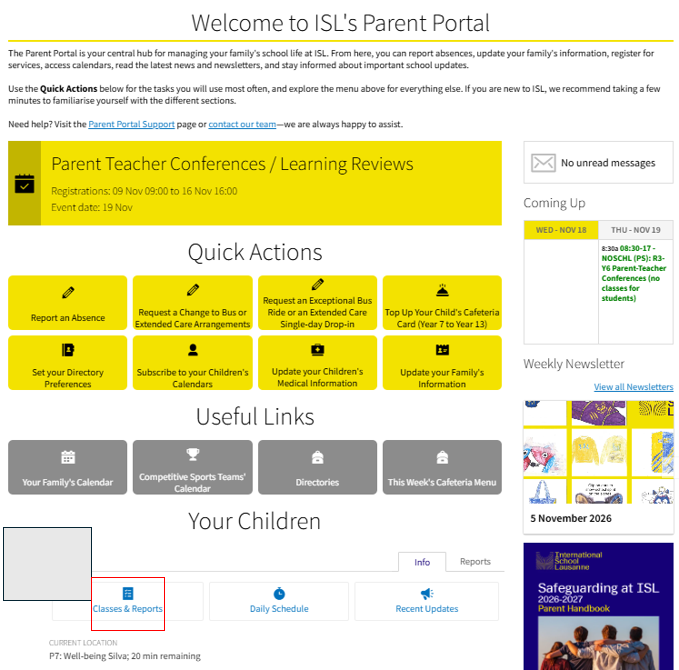
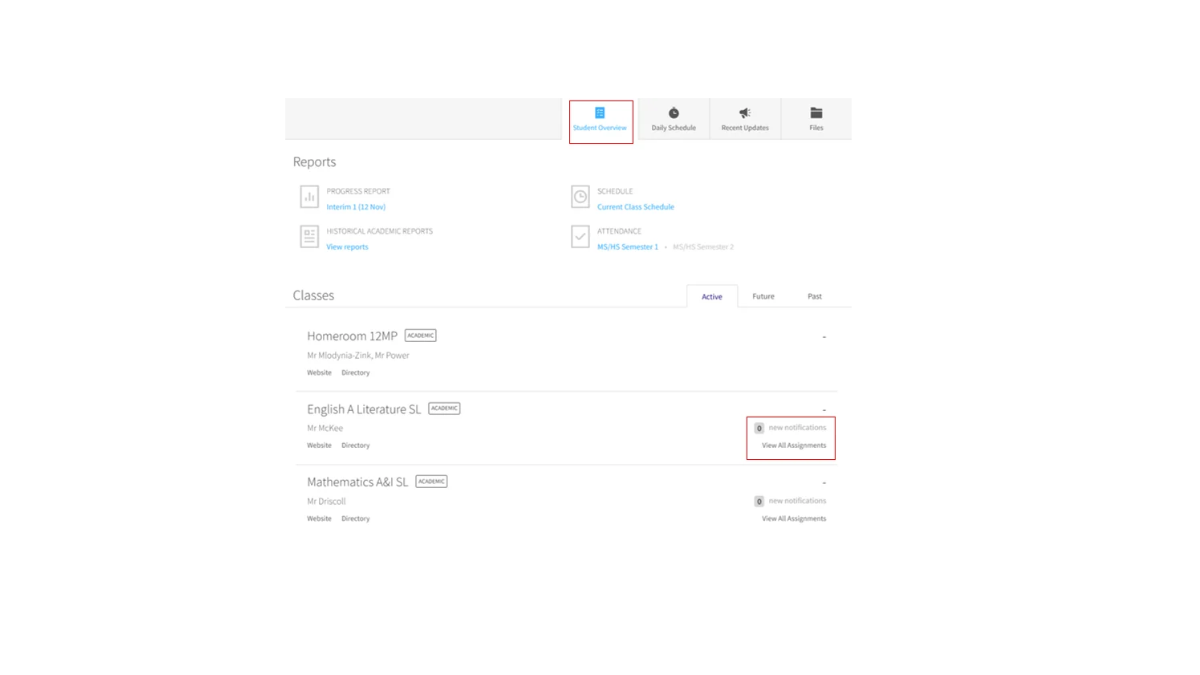
Please follow the screenshots below for quick guidance on accessing your child’s grades through the Parent Portal.
1.Click “Classes and Reports” at the bottom of the homepage.
2.Click “Student Overview” and then “View All Assignments” to the right of each subject.
For any questions about assessments and grading, please contact Daniel Pearcy if your child is in Year 7 to Year 11, or Michael Humphrey if your child is in Year 12 or Year 13.
Daniel Pearcy, Assistant Principal-IB MYP Coordinator
Michael Humphrey, Assistant Principal-IB Diploma Coordinator